ColorOS 17 Update: Eligible Devices, Features, and Release Date
Summary
- ColorOS 17 will roll out from October 29 to Oppo, OnePlus and Realme phones
- It introduces smoother animations, Agentic AI features and lockscreen styles
- The ColorOS 17 open beta is currently available for select devices.
Update: We last updated this article with the ColorOS 17 release timeline on November 3, 2026
Nothing comes close to ColorOS in terms of customization and smoothness. Oppo’s software skin is just about to get better with the ColorOS 17 update. With Realme and OnePlus phones now transitioning to ColorOS 17, this update will be available for a wide range of users. From the frosted glass effect to the lock screen island, there are plenty of new features. Let’s take a detailed look at the ColorOS 17 update, eligible devices, features, and release date.

8 New Features in ColorOS 17 Update
Oppo has finally revealed ColorOS 17, and here are all the new features coming to OnePlus, Oppo, and Realme smartphones with the update:
1. Smoother Animations And Performance
ColorOS 17 adopts a new Living Flow design language with new animations, visuals, and haptic feedback across the UI. The new Aurora Engine uses a new rendering architecture for smoother transitions. There’s Elastic Feedback, where the elements in the UI stretch or squeeze as you interact with them. Similarly, the Tidal Engine can learn your usage patterns and preferences to manage system resources accordingly. It can also improve app launch stability, speed up app launches, speed up rendering loads, and improve app jump speed. ColorOS 17 promises upto six years of a lag-free experience on eligible devices.
2. Frosted Glass Effect And Floating Bar In Apps


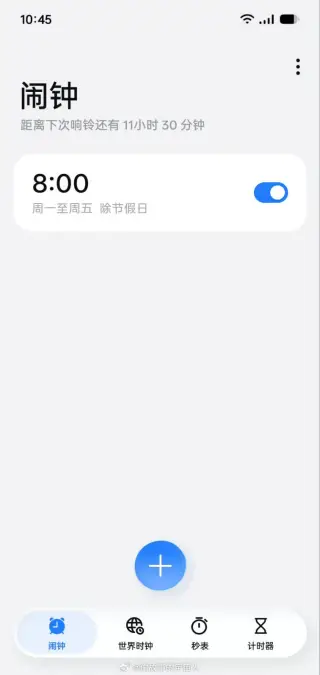


The ColorOS 17 update will bring Oppo devices one step closer to iPhones. It will feature rounded corners and a frosted glass effect similar to Apple’s Liquid Glass. Plus, you will see floating bars at the bottom, just like iOS. This is evident in system apps like Phone, Contacts, App Cleaner, Clock, and Files. You also get a glowing effect when you enter your PIN on the lock screen, and searching for an app now shows a list view.
3. AirDrop Support and Call/Notification Sharing with iPhone


With Google finally adding native AirDrop support in Quick Share, Oppo phones will gain this functionality in the ColorOS 17 update. So you can finally share those crisp Hasselblad photos with your iPhone buddies to make them jealous. And not just that, if you have an iPhone, you can share calls and notifications with it using the new O+ Connect app. It lets you use your Oppo phone as a companion device.
4. Colorful Widgets For Always On Display
When enabling full-screen Always On Display in the ColorOS 17 update, you will see colorful widgets. You can now easily identify these widgets, and they use the same gradient as your wallpaper, making them stand out.
5. Expanded Notifications


With ColorOS 17, the first notification will be expanded while the rest will remain collapsed. Currently, if you receive multiple notifications, all of them remain collapsed. You need to expand them to read more details manually.
6. New Floating Navigation Bar

Inspired by iOS, the ColorOS 17 update will add a floating navigation bar at the bottom of most system apps. This will be visible in apps like Gallery, Phone, Clock, and other apps. It will offer a more immersive navigational experience and reduce the overall clutter.
7. Agentic AI And New AI Features
ColorOS 17 introduces several new AI features, including agentic AI that can perform tasks for you on a system level. Here are all the AI features coming with the ColorOS 17 update:
- AI Mind Pilot: Want an AI tool that can organize files and photos on your behalf? The Agent Mode in AI Mind Pilot does exactly that. It can find files, sort them for you, rename them based on their content and date, and even create travel itineraries and webpages using them. Similarly, you can find photos from your last vacation, automatically create an album, or turn a photo into a cover for a vlog.
- AI Photo Agent: Editing photos on your phone can be a tiring and complex process for most users. With AI Photo Agent, you can edit your photos by simply describing the changes you want. You can also choose a template to get started or apply any of the suggestions from the tool. AI Photo Agent aims to preserve the natural look of the image while adding the changes you want. With the Style Match feature, it can analyze the image’s color tone and palette to apply a suitable look.
- AI Mind Space: Remember Mind Space, where you could save screenshots, web pages, video links, and other documents? Well, with ColorOS 17’s Mind Space feature, it gets a new Memory Collection feature that automatically categorises your Mind Space content into collections and summaries. For instance, it can group all travel-related stuff to suggest places to visit and other ideas.
- AI Mind Suggest: Similar to OneUI’s NowBrief, the AI Mind Suggest feature will show you daily briefings and upcoming flight and train tickets. If your earphones are connected, it can also recommend songs to play.
- OSee: Just like Apple’s Visual Intelligence feature, it uses your camera to identify objects in your surroundings. You can use it to look up details about a product, check the nutritional value of a food item, or translate text into your language.
- AI Call Guard: To tackle the threat of rising frauds and scams, ColorOS is adding a new AI Call Guard feature. The AI Face Swap Detection can identify faces altered by AI on a video call, while Synthetic Voice Recognition can detect AI-generated voices on phone and WhatsApp calls.
- AI Live Interpreter: You can communicate in a foreign language by using this feature to translate conversations in real time.
8. Privacy Features and Other Changes
Apart from new AI features and visual changes, the ColorOS 17 update also adds new privacy features:
- Oppo Private Computing Cloud: It protects data used in cloud-based AI tasks with end-to-end encryption and processes it in a secure environment. This ensures that your data is not accessed by third parties, including Oppo. There’s also new dual encryption to safeguard against rising threats such as Quantum computing.
- Transparency Report: As the name suggests, it provides details on which AI services have been used on your device, including the time and date, as well as which operations they performed. You can view this report on your phone and even export it if needed.
- Improved Customisation: ColorOS 17 adds new customisation options, including new lockscreen clock styles that show real-time weather effects like rain and fog. There’s also an Esports Mode theme for the Game Manager UI.
ColorOS 17 Update Eligible Devices
Oppo has officially revealed the eligible devices for the ColorOS 17 update. The update will arrive first on the flagship Find series, followed by the rest of the lineup. Also, since OnePlus and Realme are now sub-brands of Oppo, phones running on OxygenOS and Realme UI will transition to ColorOS 17. Here are all the eligible devices for the ColorOS 17 update:
Oppo Phones Eligible For ColorOS 17 Update
| Series | Model Number |
|---|---|
| Find Series | Find X8, Find X8 Pro, Find X9, Find X9 Pro, Find X9s, Find X9 Ultra |
| Foldables | Find N2 Flip, Find N3 Flip, Find N3, Find N5, Find N6 |
| Reno Series | Reno 12, Reno 12 Pro, Reno 12 Pro Manish Malhotra Limited Edition, Reno 13, Reno 13 Pro, Reno 13F, Reno 13F 5G, Reno 13 FS, Reno 13 A, Reno 14, Reno 14 Pro, Reno 14 5G Diwali Edition, Reno 14 FS, Reno 14 F Dark Side Limited Edition,Reno 14F, Reno 15, Reno 15 Pro, Reno 15C, Reno 15 Pro mini, Reno 15 Pro Max, Reno 15 FS, Reno 15 F, Reno 15 A, Reno 16 Pro, Reno 16, Reno 16c, Reno 16 FS, Reno 16 F |
| K Series | K13x 5G, K13 5G, K14 5G, K14x 5G,K13 Turbo, K13 Turbo Pro |
| F Series | F29, F29 Pro,F31 5G, F31 Pro 5G, F31 Pro Plus, F33 5G, F33 Pro 5G |
| Pad Series | Pad SE, Pad SE Matte Display Edition, Pad 3, Pad 3 Matte Display Edition, Pad 3 Pro, Pad 5, Pad 5 Matte Display Edition |
OnePlus Phones Eligible For ColorOS 17 Update
| Series | Models |
|---|---|
| Number Series | OnePlus 11, OnePlus 12, OnePlus 13, OnePlus 15 |
| Open Series | OnePlus Open |
| S series | OnePlus 13s |
| R Series | OnePlus 12R, OnePlus 12R Genshin Impact Edition, OnePlus 13R, OnePlus 15R |
| Nord Series | OnePlus Nord 4, OnePlus Nord 5, OnePlus Nord 6, OnePlus Nord CE 5, OnePlus Nord CE 6, OnePlus Nord 6 CE Lite |
| N Series | OnePlus N6, OnePlus N6x, OnePlus N6 Lite |
| Pad series | OnePlus Pad 4, OnePlus Pad 3, OnePlus Pad 2, OnePlus Pad Go 2, OnePlus Pad Lite |
Realme Phones Eligible For ColorOS 17 Update
| Phone Series | Models |
|---|---|
| GT Series | Realme GT 6, Realme GT 6T, Realme GT 7T, Realme GT 7, Realme GT 7 Dream Edition, Realme GT 7 Pro, Realme GT 8, Realme GT 8 Pro, Realme GT 8 Pro Dream Edition |
| Number Series | Realme 14, Realme 14T, Realme 14 Pro,Realme 14 Pro Lite, Realme 14x 5G, Realme 14 Pro Plus, Realme 15, Realme 15T, Realme 15 Lite, Realme 15x, Realme 15 Pro, Realme 16, Realme 16 Pro, Realme 16 Pro Plus, Realme 16 Lite, Realme 16T, Realme 16x |
| P Series | Realme P3 Lite 4G,Realme P3 Lite 5G, Realme P3x, Realme P3, Realme P3 Ultra, Realme P3 Pro, Realme P4 Power, Realme P4 Lite, Realme P4x, Realme P4 Pro, Realme P4, Realme P4s, Realme P4R |
| Narzo Series | Realme Narzo 80 Lite,Realme Narzo 80 Lite 5G, Realme Narzo 80x, Realme Narzo 80 Pro, Realme Narzo 90x, Realme Narzo 90, Realme Narzo Power, Realme Narzo 100x |
| Note Series | Realme Note 80, Realme Note 80s, Realme Note 70, Realme Note 70s, Realme Note 70T |
ColorOS 17 Release Timeline
ColorOS 17 is not just coming to Oppo devices, but it’s also set to release on OnePlus and Realme devices. This makes it the first unified update for all three smartphone brands. The rollout started on October 29, 2026. Here is the complete release timeline:
For Oppo Devices
Here’s when your Oppo phone will get the ColorOS 17 update:
| Release Timeline | Oppo Devices |
|---|---|
| Released | Oppo Find N6, Oppo Find X9 Ultra, Oppo Find X9s, Oppo Find X9 Pro, Oppo Find X9 |
| Released | Oppo Find N5, Oppo Find X8 Pro, Oppo Find X8, Oppo Reno 16 Pro, Oppo Reno 16, Oppo Reno 16c, Oppo Reno 16 FS, Oppo Reno 16F |
| November 2026 | Oppo Find N3, Oppo Find N3 Flip, Oppo Reno 15 Pro Max, Oppo Reno 15 Pro, Oppo Reno 15 Pro Mini, Oppo Reno 15, Oppo Reno 15 FS, Oppo Reno 15 F, Oppo Reno 15c, Oppo Reno 15 A, Oppo Reno 14 Pro, Oppo Reno 14m Oppo Reno 14 Diwali Edition, Oppo Reno 14 FS, Oppo Reno 14 F, Oppo Reno 14 F Dark Side Limited Edition, Oppo K14x 5G, Oppo K14, Oppo K13x, Oppo F33, Oppo F31, Oppo F29 |
| December 2026 | Oppo Reno 13 Pro, Oppo Reno 13, Oppo Reno 13 FS, Oppo Reno 13A, Oppo Reno 13F, Oppo Reno 13F, Oppo K13 Turbo Pro, Oppo K13 Turbo, Oppo K13, Oppo Pad 5, Oppo Pad 5 Matte Display Edition, Oppo Pad 3 Pro, Oppo Pad 3, Oppo Pad 3 Matte Display Edition |
| 2027 Q1 | Oppo Find N2 Flip, Oppo Reno 12 Pro 5G, Oppo Reno 12 Pro Manish Malhotra Edition, Oppo Reno 12, Oppo F33 Pro, Oppo F31 Pro, Oppo F31 Pro, Oppo F29 Pro, Oppo Pad SE, Oppo Pad SE Matte Display Edition |
For OnePlus Phones
Here is the release timeline of the ColorOS 17 update for all OnePlus phones:
| Release Date | Eligible Devices |
|---|---|
| Released | OnePlus 15, OnePlus Pad 4 |
| Released | OnePlus 15R, OnePlus 13, OnePlus 13s |
| November 2026 | OnePlus Open, OnePlus 13R, OnePlus 12, OnePlus Nord 6, OnePlus Nord CE6, OnePlus Pad 3 |
| December 2026 | OnePlus 12R, OnePlus 12R Genshin Impact Edition, OnePlus 11, OnePlus Nord 5, OnePlus Nord CE6 Lite, OnePlus Nord CE5, OnePlus Pad 2, OnePlus Pad Go 2 |
| Q1 2027 | OnePlus Nord 4, OnePlus N6, OnePlus N6x, OnePlus N6 Lite, OnePlus Pad Lite |
For Realme Devices
For all the Realme users out there, here’s when you will get a taste of the ColorOS 17 update:
| Release Timeline | Realme Devices |
|---|---|
| Released | Realme GT 8 Pro, Realme GT 8 Pro Dream Edition |
| Released | Realme GT 7 Pro, Realme 16 Pro Plus, Realme 16 Pro |
| November 2026 | Realme GT 7, Realme GT 7 Dream Edition, Realme GT 7T, Realme 16, Realme 16 Lite, Realme 15 Pro, Realme 15, Realme 15x, Realme 15T, Realme P4 Pro, Realme P4, Realme Narzo 90 5G, Realme Narzo 90x 5G |
| December 2026 | Realme GT 6, Realme GT 6T, Realme 16T, Realme 16x, Realme 14 Pro Plus, Realme 14 Pro, Realme 14, Realme 14T, Realme 14x 5G, Realme P4s 5G, Realme P4x 5G, Realme P4R 5G, Realme P4 Power, Realme P3 Pro, Realme P3 5G, Realme P3 Ultra, Realme P3 Lite 5G, Realme P3x 5G, Realme Narzo Power 5G, Realme Narzo 100x 5G, Realme Narzo 80 Pro 5G, Realme Narzo 80 Lite 5G, Realme Narzo 80x 5G |
| 2027 Q1 | Realme P4 Lite, Realme P3 Lite, Realme Narzo 80 Lite, Realme Note 80, Realme Note 80s, Realme Note 70, Realme Note 70s, Realme Note 70T |
Phones That Received The ColorOS 17 Update
ColorOS 17 rollout has begun in a phased manner for Oppo, OnePlus and Realme devices. Currently a total of 29 devices have received the ColorOS 17 update with more devices set to receive it in the future. We will update this list as and when more devices receive the ColorOS 17 update
- OnePlus 15
- OnePlus 15R
- OnePlus13
- OnePlus 13s
- OnePlus 13R
- OnePlus Pad 4
- Oppo Find X9 Ultra
- Oppo Find X9 Pro
- Oppo Find X9
- Oppo Find X9s
- Oppo Find X8 Pro
- Oppo Find X8
- Oppo Find N6
- Oppo Find N5
- Oppo A6
- Oppo A6s
- Oppo A6x 4G
- Oppo A6x
- Oppo A6t 4G
- Oppo A6t
- Oppo K14
- Oppo K14x
- Oppo Reno 16
- Oppo Reno 16 Pro
- Oppo Reno 16c
- Realme GT 7 Pro
- Realme GT 8 Pro
FAQs
1. When is ColorOS 17 Coming Out?
ColorOS 17 has started rolling out to eligible devices from October 29, 2026
2. How can I Update My Phone To ColorOS 17?
To update your phone to ColorOS 17, you need to head over to Settings > System and Update > Software Update. Wait for the system to check for updates and download if an update is available.
3. Why are Realme and OnePlus phones transitioning to ColorOS?
Realme and OnePlus have revealed that the transition to ColorOS will streamline things and help them roll out updates faster. Since Realme UI and OxygenOS were more or less slightly tweaked versions of ColorOS, the change wouldn’t be much noticeable either.
4. What’s New In ColorOS 17?
ColorOS 17 brings smoother animations, better performance, and customization. You get a frosted glass effect, smoother animations, new AI features, and lock screen styles.